Microsoft says ~30 million powerpoint presentations are created every day world wide. If you assume that this is ~10 hours per deck, we are spending 34000 human years on creating decks every day. A significant chunk of that time is completely wasted doing things like fiddling with formatting and doing text alignment.
I like giving presentations. I hate making slide decks. I spend way too much time making slide decks. Most of that time isn’t actually that useful in terms of conveying information. It’s bs tasks like fiddling with positioning, aligning text, creating figures. Or it’s researching and pulling quotes or summarizing things that I already know but don’t have exactly ready for a deck. These things are necessary to have a good presentation — I’ve seen many a research PhD slide deck to know otherwise — but man all these little details bloat out to like 10 hours per deck.
We eventually figured out a hack to use coding agents to bring our average slide deck creation time to ~25 minutes of active work. The finished output is generally more aesthetic, more informative, and more accurate than anything we could do ourselves by hand. Certainly not in the same timeframe.
If you want to skip to just trying this yourself, download the admin skillset (or the creating-slides and record-transcribe skills). In a single command:
npx nori-skillsets install admin # then just ask claude to make you a slide deck
A few key insights:
- A slide deck as a finished product is separable from the software used to create it. For decades, the only way to make a slide deck is to use a tool like PowerPoint, so it was easy to just mistakenly conflate the two.
- Slides have two modes — a ‘editing’ mode that depends on an internal structured representation to manipulate visual elements; and a ‘presenting’ mode that rasterizes the structure to essentially produce a set of images. There is no strict requirement that the ‘editing’ mode uses a particular data structure.
- Coding agents are terrible at parsing visual media but are fantastic with HTML, which essentially constructs arbitrary visual media using structure.
- Edits to slide decks can generally be done in batch.
With that in mind, here is how we constructed the deck for our board meeting last week.
Give your agent access to relevant context. We maintain an instance of Nori (our coding agent harness) that has access to emails, Slack MCP, design docs, code, and of course, previous board decks.
Tell the agent to construct an HTML page that mimics a slide deck. Emphasize that there should not be complex dependencies, it should really be a single page bare html/css. It helps to provide an example.
Review the deck with audio recording on. My team got in a room and turned on a CLI voice recorder (sox, in our case). We went through the deck and just chatted about what we liked, what we didn’t. Google Meets voice recording will also serve fine here.
Have the agent edit based on the transcript. We used whisper, Google Meets will just provide a transcript, etc. Fed the transcript back to Nori, which went and updated the HTML.
Rasterize. Ask the agent to turn the HTML page to a pdf. It will generally do this without having to download anything else, using chrome in headless mode and the --print-to-pdf command.
The majority of the time was spent reviewing the deck, which we would have done anyway. The agent created figures, positioned everything correctly, used our branding, and even pulled out specific quotes and customer names.
I obviously can’t share the board deck, but I did want to share an example. I created a deck for our open source agent TUI. I did not go through any editing stage for this. These images are basically just slides from the raw deck. It took about 5 minutes to create, and virtually 0 thinking time actually spent.

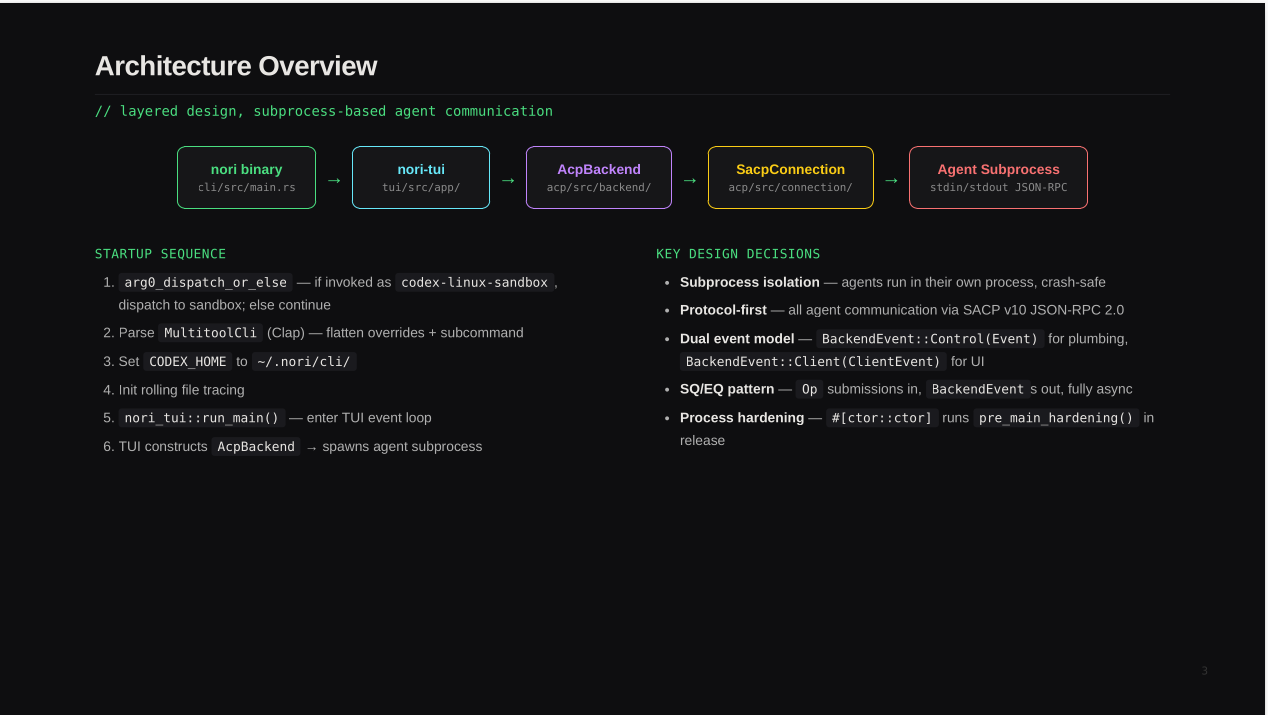
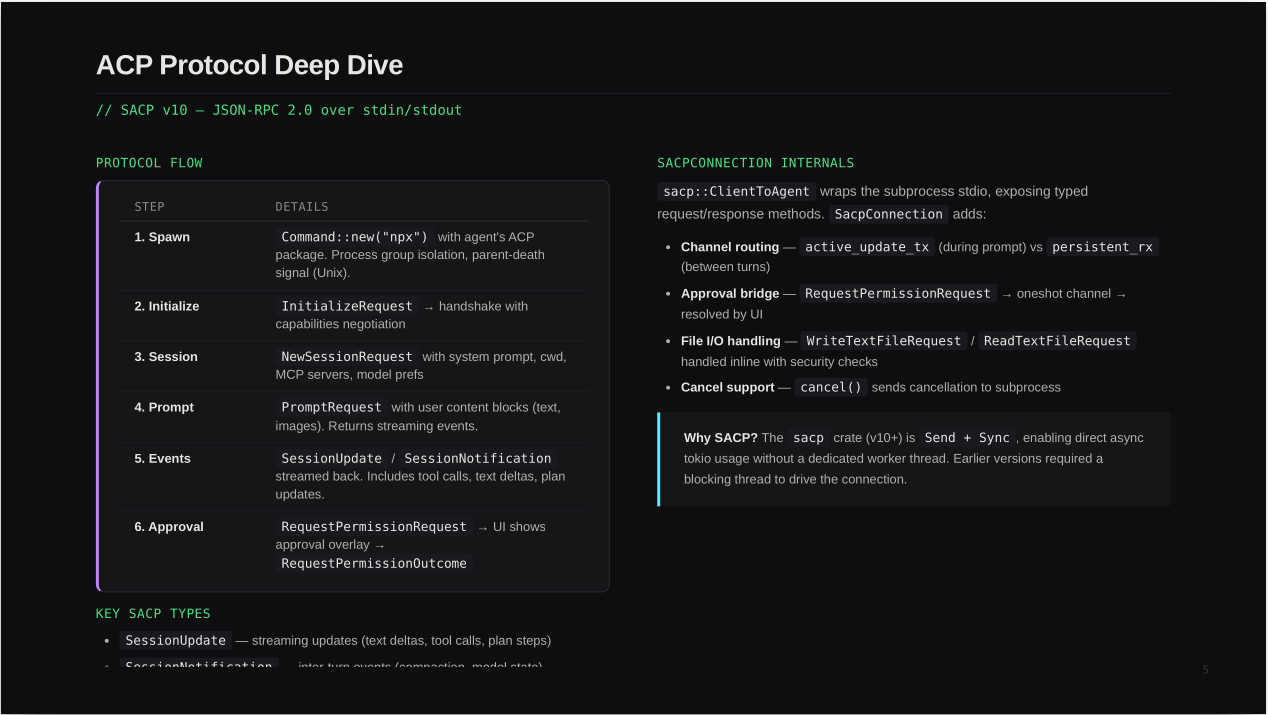
The full PDF of the deck is here.
Misc other thoughts:
- I’m basically convinced that HTML will be / ought to be the lingua franca for all things visual with coding agents. We’ve started using static HTML sites for everything because it is so easy to just ask an agent to, for e.g., throw up a dashboard of our ec2 instances with a static HTML site. Faster than opening chrome, logging into aws, clicking through the EC2 panel, and trying to parse it. And because the static dashboard that the agent makes is fully customizable, we can often get a better user experience too.
- I’m not sure I would have come up with this flow for generating slide decks myself. My (non-technical) strategic advisor came up with this flow. More generally, I think the folks who are non-technical-technical people are going to innovate a lot, empowered by the agents. This is different than the usual thing that happens, where the non-technical people are years behind the techies.
- Gamma is a startup aimed specifically at taking down powerpoint. They are doing $100m ARR and have a $2.1b valuation. Is any of that sustainable, given the above? How soon before the admins and corporate strategy folks realize that the agents can just do this automatically, and at way higher quality?