Editor’s note: sign up to attend our next Agentics flagship meetup on August 19th in NYC. We have an amazing lineup of speakers from Nori, Modal, Warp, Opus, Goose, and more!
In a recent Agentics post I wrote about how some AI agents aren’t able to properly handle removing complexity. I used our AI on-call as an example — I talked a bit about how our automatic bug triage agents got worse because the models became too smart for their own good.
A lot of people reached out asking about the triage bot!
So I figured I’d take a beat to write more about how we set it up and what it can do.
One of the first things that we did with our background agents is try to automate our on-call process. On-call is a natural wedge use case for AI and AI enablement.
- Very few people like being on call, no one likes being paged at 4am because someone or something brought down prod, and as a result everyone would love to not do it.
- Even though they are vital, on-call rotations take up time from things that feel more productive, like pushing new features.
- The actual work of an on-call feels very well set up for the LLMs. Most of the on-call’s job is to do a pretty mechanical roll back, then root cause some issue using surrounding context.
Virtually everyone who starts building their own background agent or who uses Nori sees this as their obvious first project. It’s one of the standard ‘dev automation’ flows that are becoming increasingly common. Sales pitch up front: if you were using Nori, setting this up would be a single paragraph in your slack. We built Nori to solve these kinds of dev automations (among other things).
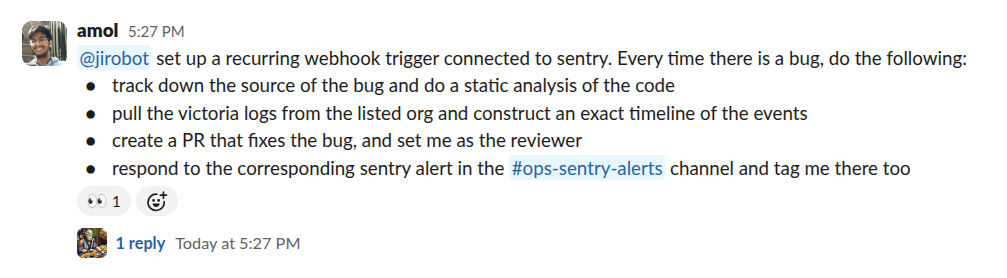
But if you weren’t using Nori, how would you go about automating something like this?
There are three parts:
- The agent orchestration
- The trigger (starting a request)
- The context/integrations
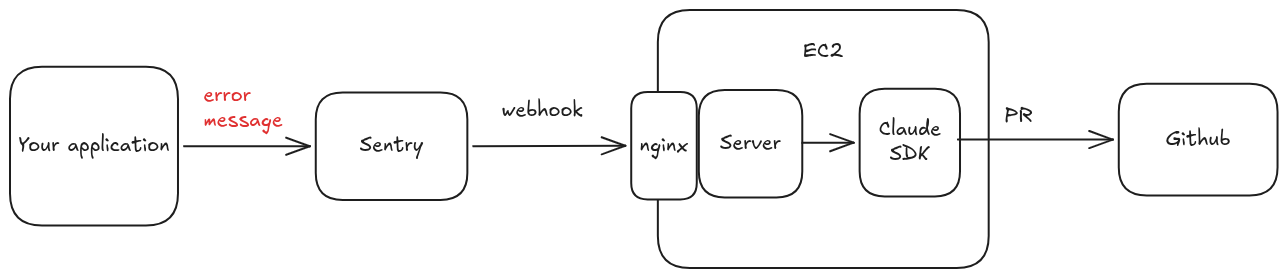
Orchestrator: For the most barebones implementation, you don’t need to do anything fancy with long running connections or sockets or ephemeral sessions. Instead, you can spin up a single beefy EC2 instance that’s running a basic Express TypeScript server, and maybe a SQLite table for state.
The server logic is simple:
- Every inbound request should have some UUID.
- If the UUID is not registered in the SQLite table, add it. Send the inbound request to something like the Claude SDK, which will return a response and a resume key. Store the resume key in the table, keyed by the request UUID.
- If the UUID is already in the SQLite table, grab the resume key and simply call the Claude SDK with the
--resumeflag.
The Claude SDK manages session/transcript state, so you don’t have to worry about that much at all.
Trigger: Ideally, you already have some kind of alerting system built on Sentry or Grafana or Datadog. Most of these things can be configured to call out to a webhook when there are errors.
Grab the EC2 IP address (make sure the EC2 is listening on some port), slap nginx on the EC2 instance to route incoming requests to your orchestration server, and then put that IP address into your error reporting system.
If you do everything right, you should be able to fire a test webhook result from your reporting software of choice, and watch Claude spin up on your EC2 instance.
Context: Of course, that Claude instance won’t be able to do anything, because there’s nothing actually on your EC2 instance besides the server!
Since we’re trying to automate our on-call, at minimum we’d need integrations to git (code source) and wherever you dump logs. If we don’t care about security at all, we can set up long lived access tokens in the EC2 env. For GitHub you can create a PAT or an organization GitHub app. Datadog, Sentry, Grafana, etc. all have MCP servers that you can auth into manually, that should persist their tokens.
You can also add a few skill files that simply tell the Claude SDK to:
- Clone/pull git when the request comes in
- Figure out what the bug is
- Post a PR to GitHub with the fix
That’s basically it for the most basic version of this flow. Whenever there’s a bug, the server ingests the webhook data that details the bug (ideally including things like stack traces), and then fires off an agent to figure out what’s going on. The agent then collects a bunch of relevant context, and opens a PR on GitHub that an engineer can look at later.
The first time this runs, it feels like magic. The second time it runs, it probably won’t run. You’ll likely run into an error because the first bot is still running and you didn’t necessarily think through what it would look like to have multiple agents running at the same time. From here, there are all sorts of interesting orchestration and runtime problems that you may need to tackle.
- You may need to run these boxes on Kubernetes so that they can spin up and cool down automatically based on demand. You’ll have to figure out how to route requests between boxes.
- Or you may need to make your EC2 box bigger and figure out how to isolate individual Claude sessions — maybe per folder, for example. You’ll have to also make sure that any state loaded into those sessions is kept fresh for future requests.
- You may need to provision the box with more preexisting context — skills and AGENTS.md files, but also multiple git repos and dependencies.
- You may need to set up a bunch of integrations, MCP servers and databases and other things that will help the model get better at properly root causing the issue. You’ll have to figure out how to keep these all live and fresh (for example, deal with token expiration).
- You may need to make the system “resumable,” so that it will respond to comments on git or in slack after an initial trigger.
- You may need to support other ways to wake up the bots, like cron or webhooks.
- You may need to make it provider agnostic, so if Claude goes down your system can stay resilient.
- You may need your users to be able to directly interact with the cloud-hosted bot, instead of waiting for Sentry to trigger an event.
The feature list here is impossibly large, even before you get into the polish necessary to make this feel good. Virtually every team that is not a large enterprise with some pre-existing platforms team ends up reaching for a third party provider to manage all the annoying basics.
I was tempted to stop this post here, but there’s more isn’t it?
Yea, fine, we can do all of this, but it just begs the question: does it work? The AI world is littered with application-slop — tools and ‘products’ that no one asked for and no one needs because they don’t actually solve a problem. Does the AI on-call work?
Yes, but with an asterisk.
The big problem with this kind of set up is that it starts great but devolves into slop surprisingly quickly. Low hanging fruit is easy because it’s low hanging fruit; the agent is great at solving those problems, but those are exactly the problems that an engineer could’ve figured out relatively quickly. Once you solve all the easy bugs, you’re left with hard heisenbugs or random noise, and the agents are worse at dealing with both of those.
As a result, we see a lot of churn from teams that roll their own as a CTO weekend side project. The ‘simple’ version of this workflow is often way too brittle. Teams will generally turn off their home grown version within a month.
Does that mean this kind of workflow is dead in the water?
I don’t think so. We have little bots running every time we have a Sentry error, and have for months. It’s meaningfully sped up our SLA even when the bot isn’t able to one shot the problem.
As with all things in the agent world, the big unlock is context. Every one of our agent sessions gets spun up in the cloud with a lot of integrations, an organization-wide memory bank, and the ability to safely SSH into different machines to poke around at logs. These added capabilities make it much more likely that the agent will surface something useful, even if it isn’t an actual bug fix.
We also force the agent to try and do a root cause. The exact way this works tends to be domain specific. For a web error, the agent uses Playwright to manipulate a browser using dummy credentials. For a CLI/TUI bug, the agent uses tmux to drive a terminal, actually entering in keys like it was a user. The agents even have the ability to spin up an entirely local dev environment of our system. This is built on a real slack instance with a real Modal deployment. The only things running locally are the UI server and the orchestration logic. If the agent is trying to catch a race condition, it’s instructed to literally hammer the local dev box until it catches the bug in a live repro.
I think we merge ~30–40% of these PRs. 80–90% of the ones that have a good root cause analysis, though that’s often harder to get. What about the other 60–70%?
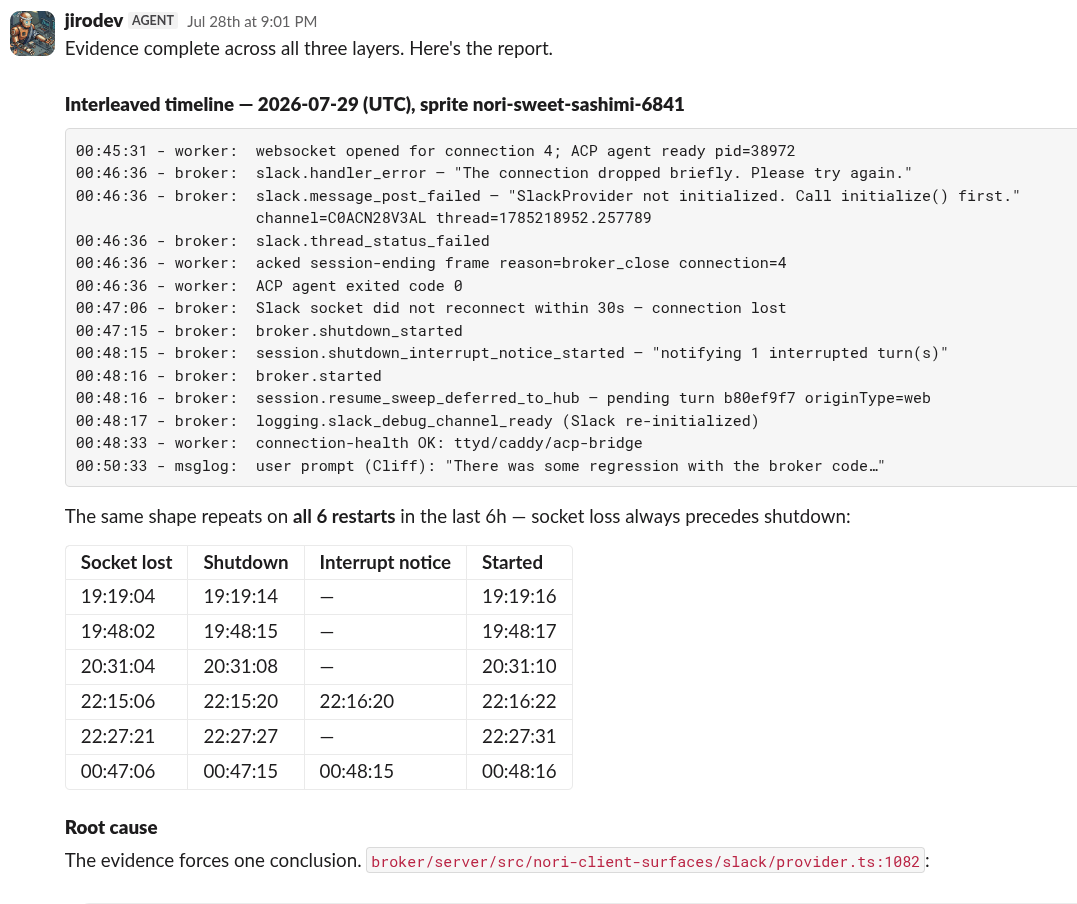
In those cases, we often use the agent as a first pass analysis. As part of its root cause attempt, the agent has to pull all the logs across our distributed system and string them together into a coherent trace. We can resume any of these sessions directly in slack or on any other surface, so it’s trivial to pick up a session and just ask the agent what it learned, what it tried, and how to try again. There are definitely days where I’ll roll out of bed, check my phone, and pick up a preliminary analysis done by an agent.
This is really really powerful, because we’ll often have an immediate sense of what went wrong just by looking at the reconstructed logs, even if the agent didn’t get everything right. I basically don’t spend any time trying to trace a log across machines. The agents do that now.
I do think that there is a bit of a mindset shift required to make this really work. You have to be willing to just close PRs and not worry about it. The tricks we use above offset some of the worst of the agent behaviors, but if you have noisy logs you’ll have noisy agents creating noisy PRs.
Which brings me to the last thing: you’re going to need to invest in your logging stack! Most people don’t really do this particularly well. No judgement, I get it. Logs are reactive, they don’t really move the product forward, and for the most part there’s a strong incentive to show more rather than less. The agent on-call adds material cost to having bad logging infra.
Taking a step back, I’m a big believer in agents that have to earn your trust. We don’t go in assuming that any particular agentic automation will solve all our problems immediately, it’s an iterative process of running the loop, making sure it works the way we want, and slowly giving more responsibility. If an agent can do 95% of a job 95% of the time, that’s a large failure rate that will be unsustainable in the long run if you try full, but will be massively productive with even a little bit of human review.[1]
- There are some loops that run automatically that we basically always auto approve — things like docs gardening, social media syndication, dead code cleanup. But there are a lot of other loops that always require at least a human skim, like refactor analysis or new feature development or bug fixes proposed by our AI on call.