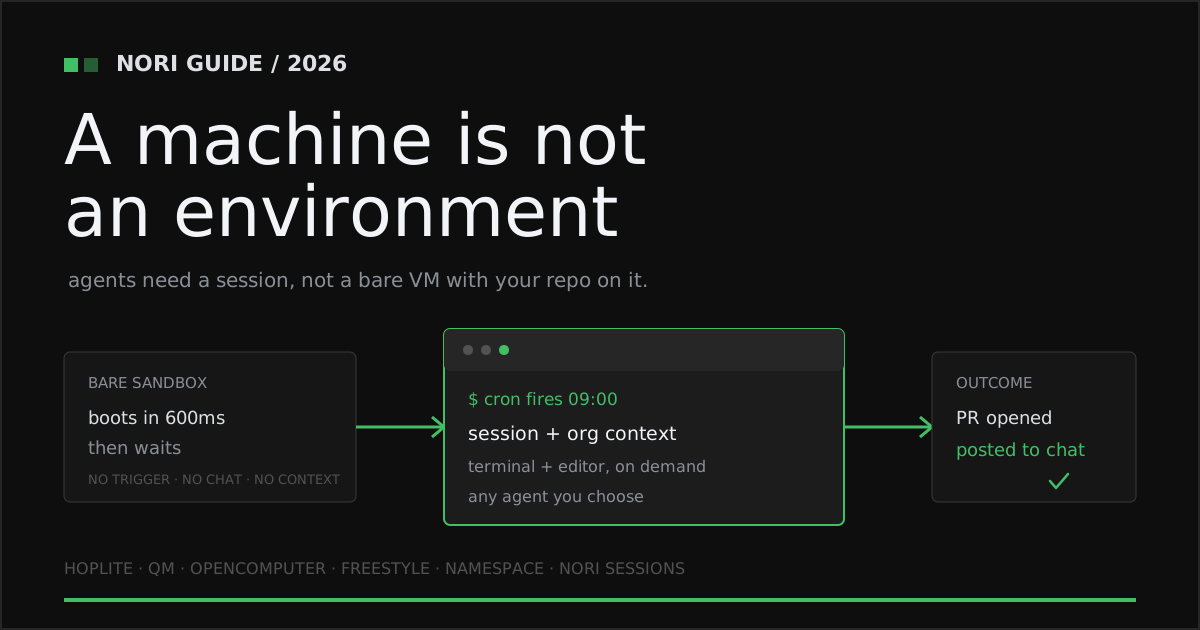
For fifteen years “cloud dev environment” meant one thing: move a human’s laptop into a data center. Keep the editor, keep the terminal, drop the setup pain. Every design decision followed from the assumption that a person was sitting there.
That assumption broke. The occupant of the machine is now a coding agent, and agents want the opposite of what humans wanted. They do not need typing latency, they need a machine in under a second. They do not work one branch at a time, they fork. They do not clock out, they run overnight. And critically, they do not open a laptop to get started — something has to start them.
That last point is where the whole category is being decided, and where most of the 2026 entrants stop short. This guide covers the platforms genuinely building for agents, what each contributes, and why the winning environment is the one that owns not just the machine but the trigger, the conversation, and the context.
Freestyle: the fastest primitive in the category
Freestyle is the sharpest pure compute play here, and it is fast in a way that changes what you can build. Freestyle VMs are “Full Linux VMs for AI agents” with real root access, nested virtualization, and multi-user isolation via systemd services and groups. Machines provision in “under 600ms from API request to ready machine,” you can clone a running VM “without pausing it — get full copies in milliseconds,” and hibernation means you “pay nothing while paused.” The company describes them as “Real Linux VMs made for running tens of thousands of agents” (Freestyle).
The second product is the more original idea. Freestyle Git is an “API-first Git filesystem for AI agents” — commits, diffs, rollback, and review available as calls rather than shell invocations, with bidirectional GitHub sync. That is a real insight about how agents actually manipulate code.
Freestyle is an SDK for people building agent products. It hands you a superb machine and a git primitive, then leaves the environment itself — who may start a run, when it starts, what the agent knows about your company, where the result lands — entirely to you. If you are building a platform, start here. If you need a platform, you are about to write the four layers Nori Sessions already ships.
OpenComputer: VMs that refuse to disappear
OpenComputer, by Digger, makes a pointed architectural bet: containers are the wrong shape for long agent work. Every sandbox is a “full Linux VM — its own kernel, memory, and disk, isolated at the hardware level,” on KVM. The persistence claim is the pitch: “nothing tears down after a command finishes,” and machines run for “hours or days.” You get instant named snapshots with fork or restore in about a second, hibernation that lets an idle machine “wake in milliseconds with everything exactly where you left it,” and CPU and memory that can be “resized while the sandbox is running. No restart.” It is built explicitly for “harnesses like Claude Agent SDK and OpenCode” (OpenComputer).
Pricing is metered at $0.004 per minute — $0.24 per hour, or $168.72 for a month of continuous use, with 20 GB of disk included. That meter is honest, and it is also the catch: the entire value proposition is machines that stay up for days, billed by the minute they stay up. The more the architecture works as advertised, the more the invoice grows. And like Freestyle, it is a machine API. Nothing in it decides that a job should run at 9am, or tells your team what happened.
Namespace Devbox: the managed workspace, for both occupants
Namespace Devbox offers “managed developer environments with enterprise-grade performance for humans and agents,” and it is the most polished operational experience in this group. Devboxes are persistent and fully managed, reachable through VS Code, Cursor, JetBrains, Zed, or SSH, and connections are “tunneled securely through the Namespace API with no public IPs or open ports required” — a genuinely good security default. Environments are defined “with standard Dockerfiles” and the definition is checked into source control. They “automatically pause when idle to optimize your costs,” resume in seconds, and run on x86_64 and aarch64 including Apple Silicon. Pricing is per-minute by size: $0.004 small, $0.008 medium, $0.016 large, $0.032 extra large, with no compute charge while paused (Namespace).
Read the positioning closely: “for humans and agents.” Namespace has built an outstanding workspace and made agents welcome in it. But a workspace is something you attach to. There is no trigger layer that starts work on a schedule, no chat surface that lets a teammate dispatch a task from Slack, and no mechanism that loads your organization’s conventions into every fresh box. Those are exactly the layers that convert a great machine into an agent practice.
Hoplite: the full-service agent, priced per seat
Hoplite moves up the stack and sells the outcome. It offers “cloud coding agents that work in isolated development environments, verify their changes, and open pull requests,” and describes the loop plainly: “Hoplite takes a software task from request to reviewed code.” You start a thread with the task you want completed, and it works in cloud environments wired to your GitHub repositories with setup scripts and environment variables (Hoplite).
Pricing is where Hoplite reveals its shape. Pro is $99 per seat per month ($82.50 billed yearly) with 25 pooled sandboxes per seat at 4 vCPU and 16 GiB, plus $100 per seat per month in included credits. Scale is $299 per seat per month ($249.17 yearly) with 150 pooled sandboxes at 16 vCPU and 64 GiB and priority support. Enterprise is custom, with contractual SLAs and an architecture review (Hoplite pricing).
Per-seat pricing tells you the product still imagines a person attached to every unit of capacity. That is a strange fit for autonomous work, because the whole promise of an agent is that it does not consume a seat — it consumes a machine, at 3am, while everyone is asleep. Nori Sessions prices the runtime instead of the human, which is the unit that actually does the work.
QM: the closest thing to Nori, if you want to run it yourself
QM (Quartermaster), open-sourced by Y Combinator, is the most interesting entrant of 2026 because it independently arrived at the same architecture Nori Sessions ships. It bills itself as “a multiplayer agent harness for work,” running in “Slack and web” where “the same identity and configuration carries between Slack and the web app.” The isolation model is exactly right: “Each person and each room has its own scoped memory, files, keychain view, permissions, crons, web apps, and durable sandbox.” It is harness-agnostic across Pi, OpenCode, Codex, and Claude Code — “pick your own harness and model and switch between them” — and it is MIT licensed (QM repository).
Scoped memory, per-room permissions, crons, chat-native control, agent choice. That list is a validation of this entire category thesis, published by the most pattern-aware institution in startups.
There is one line that decides whether it is right for you: “Each deployment runs in the operator’s own cloud account.” QM is software you deploy and operate. You own the sandboxes, the identity plumbing, the Slack app, the upgrades, and the pager. The license is free; the platform is a project. Nori Sessions gives you the same architecture as a product that is already running, with an org setup path and support attached.
| Platform | What you get | Unattended (cron / webhook) | Chat-native control | Durable org context | Pricing model |
|---|---|---|---|---|---|
| Freestyle | VM + git SDK for agents | ✗ you build it | ✗ | ✗ | Free to start; usage-based |
| OpenComputer | Persistent KVM VMs, fork + hibernate | ✗ you build it | ✗ | ✗ | $0.004/min ($168.72/mo continuous) |
| Namespace Devbox | Managed devboxes, IDE + SSH | ✗ | ✗ | Dockerfile in repo | $0.004–$0.032 / minute by size |
| Hoplite | Managed agent, task to reviewed PR | Thread-driven | ✗ | Setup scripts + env vars | $99–$299 / seat / month |
| QM (Quartermaster) | Multiplayer agent harness, self-hosted | ✓ per-room crons | ✓ Slack + web | Scoped memory per room | MIT; you run the infrastructure |
| GitHub Codespaces | Human-first cloud dev environment | ✗ | ✗ | devcontainer.json | $0.09 / core-hour + $0.07 / GB-mo |
| Nori Sessions | Full agent-first session, managed | ✓ cron + webhook | ✓ Slack + Discord | ✓ skillsets | Flat $50 / runtime / mo |
Publicly documented capabilities and pricing models as of August 2026. See vendor sources below.
A machine is not an environment
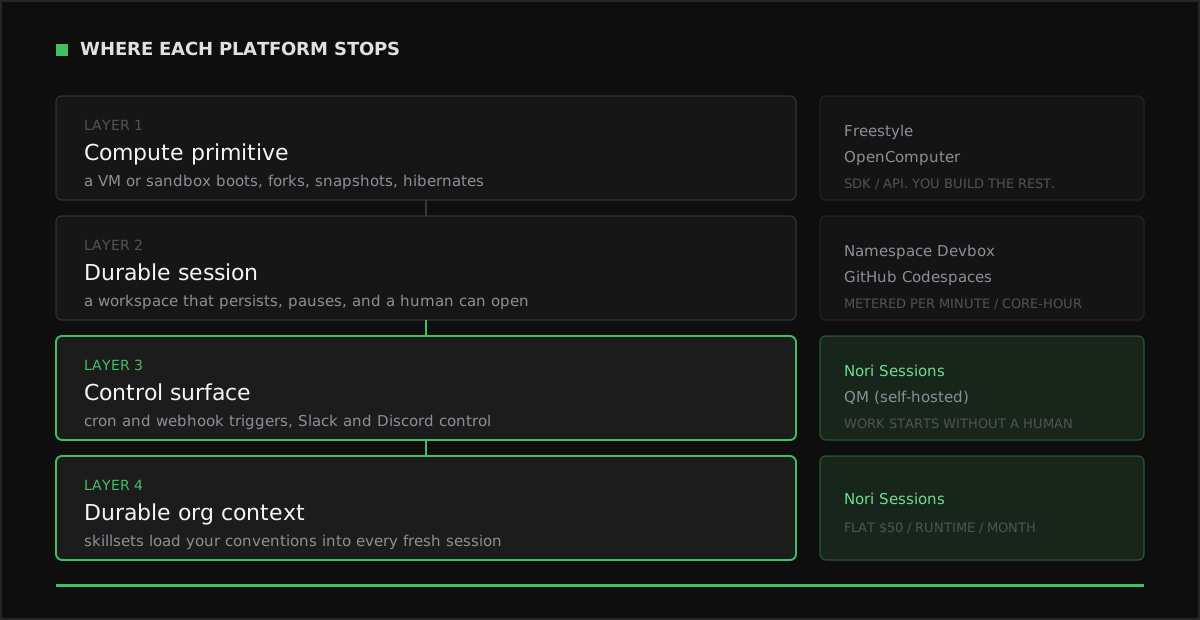
Stack the category up and it resolves into four layers. Layer one is the compute primitive: a VM that boots, forks, snapshots, hibernates. Layer two is a durable session a human can actually open. Layer three is the control surface — the triggers and chat entry points that decide when work happens and who can ask for it. Layer four is durable org context: the conventions, tooling, and workflows that load automatically so a fresh machine is not a blank one.
Almost everyone is competing hard on layers one and two, where the benchmarks are legible and the differences are milliseconds. Layers three and four are where the actual product is, because they are the difference between a machine you have to remember to use and an environment that does work while you sleep.
How to choose an agent-first cloud dev environment
- Ask what starts the work. If the answer is “a person opens something,” you have bought a workspace, not an environment. Demand cron and webhook triggers as a first-class feature, not a script you maintain.
- Put the control surface where your team already talks. An agent you dispatch from Slack or Discord gets used by everyone. An agent behind a separate dashboard gets used by the person who set it up.
- Insist that context travels. Ephemeral machines are only an advantage if each fresh one already knows your standards and tooling. Without a durable context layer, you pay the cold-start tax on every single run.
- Keep the agent interchangeable. Model and harness quality move every quarter. An environment that runs any agent lets you switch; a platform that is the agent makes that switch a migration.
- Price the runtime, not the seat or the minute. Per-seat billing assumes a human per unit of work, which autonomous runs violate by design. Per-minute billing taxes exactly the long, patient, overnight work you bought agents to do.
- Make sure a human can still walk in. When an agent goes sideways, you need a real terminal and editor on that exact machine, immediately. An environment without a front door for people is a black box with a bill attached.
Why Nori Sessions wins
Nori Sessions is an agent-first cloud dev environment that ships all four layers as one product. A session is an ephemeral cloud machine that boots on demand with your repository, credentials, and integrations already in place; the coding agent of your choice runs in it; and a human can drop into a real terminal or editor workspace the moment something needs looking at.
- The work starts itself. Cron and webhook triggers turn a nightly dependency sweep, a post-merge check, or an alert-driven fix into unattended work. Nobody has to be awake.
- Chat is the control surface. Slack and Discord launch sessions and receive results, so dispatching an agent is a message, and the outcome lands in the channel your team already reads.
- Durable org context, every time. Skillsets carry your conventions, tools, and workflows into each fresh session, so an ephemeral machine starts informed instead of starting over.
- Any agent, one environment. Run Claude Code, Codex, Gemini CLI, or an open-source harness in the same session. When the leaderboard shifts next quarter, you change a setting, not a vendor.
- A real workspace, not just an API. Terminal and editor on demand means the machine is inspectable by people, which is what makes agent work reviewable instead of merely fast.
Nori Sessions costs a flat $50 per runtime per month. The current self-serve plan includes five runtimes for $250 per month, and Premium adds hands-on organization setup and dedicated support. Set against $0.004 per minute of uptime, $99 to $299 per seat, or a self-hosted platform you staff yourself, flat capacity is the model that lets you run agents as hard as they deserve to be run.
The bottom line
2026 is the year the cloud dev environment stopped being a laptop in a data center. Freestyle made the primitive fast, OpenComputer made it persistent, Namespace made it operable, Hoplite packaged the whole task, and QM proved the architecture in the open. Take every one of those ideas seriously. Then ask the question that separates infrastructure from a practice: when nobody is watching, does anything happen? Give your agents an environment that answers yes.
Frequently asked questions
What is an agent-first cloud dev environment?
An agent-first cloud dev environment is a remote machine designed around a coding agent as the primary occupant rather than a human at an editor. It boots on demand, carries your repository and credentials, isolates the work so an agent can install, run, and break things safely, and exposes a way for the run to start and report without anyone sitting in front of it. Freestyle, OpenComputer, Namespace Devbox, Hoplite, and QM each build part of that picture.
How is an agent-first environment different from a cloud IDE?
A cloud IDE assumes a person is present and optimizes for typing latency, editor features, and session length measured in a workday. An agent-first environment assumes nobody is watching, so it optimizes for fast provisioning, forking, snapshotting, and unattended start. GitHub Codespaces bills a human-first shape at $0.09 per core-hour with $0.07 per GB-month of storage, while agent-first platforms like Freestyle advertise VMs ready in under 600ms and forks of a running machine in milliseconds.
Do I need a sandbox API or a full agent platform?
A sandbox API gives you a compute primitive and expects you to build the scheduling, chat interface, permissions, and context loading yourself. A full platform ships those layers. Freestyle and OpenComputer are excellent primitives, Hoplite and QM are closer to complete products, and Nori Sessions delivers the whole stack, including cron and webhook triggers, Slack and Discord control, and durable org context through skillsets.
Can coding agents run on a schedule without a person starting them?
Yes, but only if the environment provides a trigger layer. Most sandbox APIs leave scheduling to code you write and operate. QM gives each person and room its own crons, and Nori Sessions ships cron and webhook triggers directly, so a nightly dependency sweep or a webhook-driven fix claims a fresh cloud machine, does the work, and reports the result into chat with nobody at a keyboard.
How much do agent-first cloud dev environments cost in 2026?
Pricing splits three ways. Metered compute: OpenComputer charges $0.004 per minute, which is $0.24 per hour or $168.72 per month of continuous use, and Namespace Devbox runs $0.004 to $0.032 per minute by machine size. Per-seat: Hoplite is $99 per seat per month for Pro and $299 per seat per month for Scale. Nori Sessions is a flat $50 per runtime per month, so a busy month and a quiet month cost the same.
Should I self-host my agent environment or buy it managed?
Self-hosting gives you control and a zero license cost, and QM is a genuine option there: it is MIT licensed and each deployment runs in the operator’s own cloud account. The tradeoff is that you now operate the platform, including sandboxes, identity, permissions, and upgrades. Nori Sessions is managed, so the trigger system, chat integrations, and session lifecycle are someone else’s on-call rotation.
Sources
- Nori Sessions — triggers, chat-native control, skillsets, remote sessions, and pricing
- Hoplite — isolated cloud environments, verification, and pull requests
- Hoplite pricing — Pro, Scale, and Enterprise tiers with sandbox capacity
- QM (Quartermaster) — Slack and web interfaces, scoped memory and crons, harnesses, MIT license
- OpenComputer — persistent KVM VMs, snapshots, hibernation, and per-minute pricing
- Freestyle — sub-600ms VMs, live forking, and the API-first git filesystem
- Namespace Devbox — managed environments for humans and agents, tunneling, and per-minute pricing
- GitHub — Codespaces compute and storage billing
Related guides
- Top AI Coding Agent Runtimes & Sandboxes in 2026 — the compute layer underneath every environment in this guide.
- The Best Unattended AI Coding Agents in 2026 — why the trigger layer is the feature that changes how a team works.
- The Best Durable Context Platforms for AI Coding Agents in 2026 — how org context survives an ephemeral machine.