What is the best background AI coding agent in 2026?
It depends on where your work starts. If your code and issues live on GitHub, GitHub Copilot’s cloud agent is the low-friction default. For a dedicated autonomous engineer with memory and automations, look at Devin. For open-source infrastructure you run yourself, OpenInspect. For test generation only, Tusk. For frontend work from Slack or Jira, Builder.io. AWS teams should evaluate Kiro, which has absorbed Amazon Q Developer. Pick Nori Sessions when you want to run any harness on your own subscriptions, triggered from Slack, Discord, cron, or webhooks.
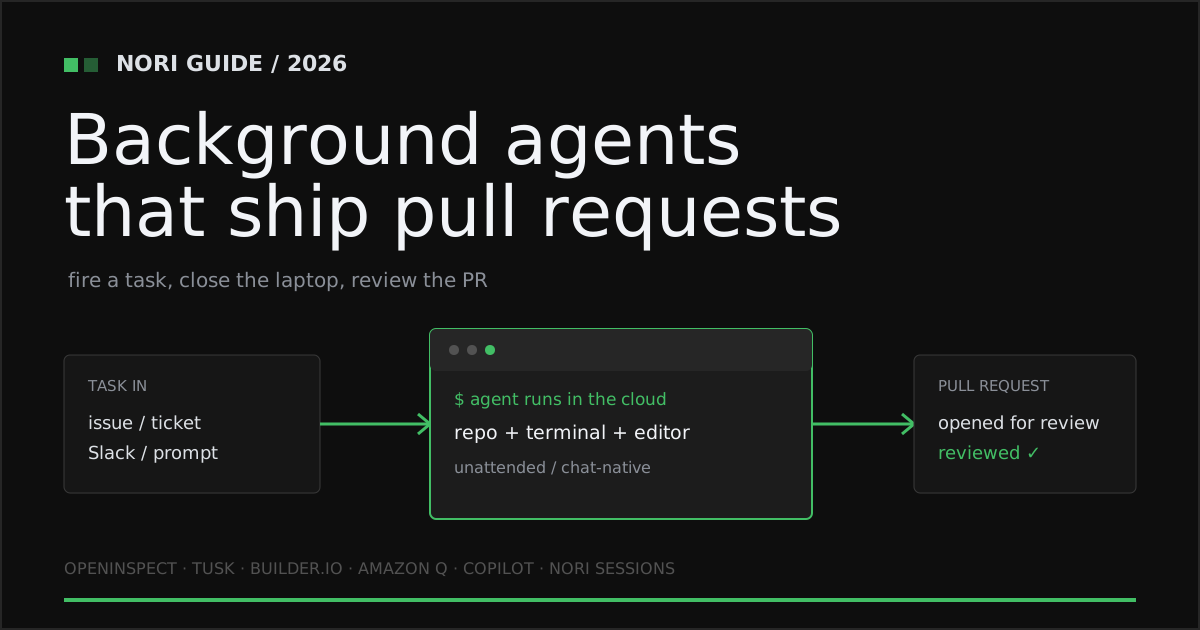
What a background AI coding agent is
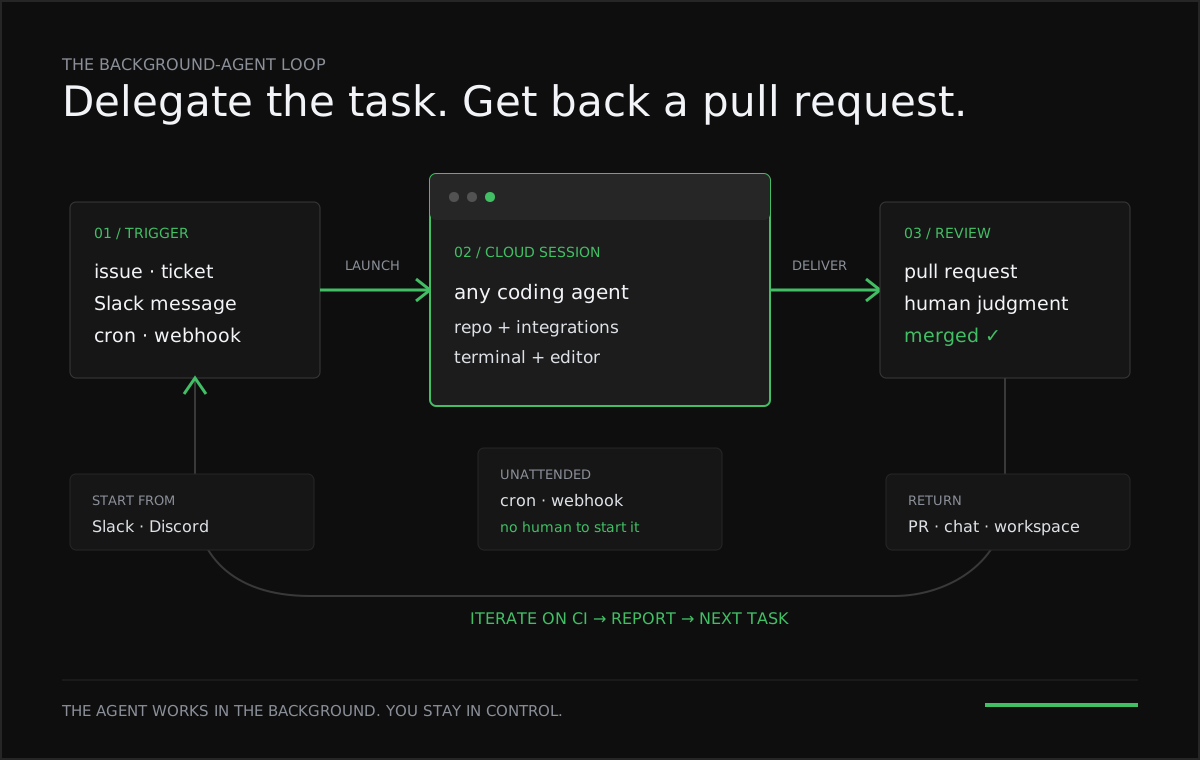
A background AI coding agent is a coding agent that runs unattended in a cloud environment. You hand it a task — from an issue, a chat message, a schedule, or a webhook — and it clones the repository, edits code, runs tests, iterates on failures, and returns a pull request for review. It is built for engineering teams that want to delegate well-scoped work (bug fixes, small features, migrations, test backfills, recurring maintenance) instead of pairing with an assistant keystroke by keystroke.
The shift from pairing to delegating changes what the tool has to provide. A pair programmer needs a cursor. A background agent needs a place to run, a way to be triggered, and a way to report back. The products below differ mostly on those three things, plus which agent and models you are allowed to use and how you pay. For the wider field of cloud agents, see our cloud coding agents comparison.
GitHub Copilot cloud agent: the default for GitHub teams
The background agent most teams already have is GitHub Copilot’s cloud agent (formerly called the coding agent). You start it from an issue or pull request, the agents panel, or a schedule or repository event, and it can also be invoked from Slack, Microsoft Teams, Linear, Jira, and Azure Boards. It edits files and runs tests and linters in an ephemeral cloud development environment you configure with copilot-setup-steps.yml, then opens a pull request (Copilot on GitHub docs, Copilot integrations). As of October 2026 the cloud agent is included on Pro ($10/month), Pro+ ($39/month), and Max ($100/month), with usage drawn from GitHub AI Credits; Pro+ and Max can also delegate to third-party agents such as Claude and OpenAI Codex in preview (Copilot plans). The documented limits: a 59-minute maximum execution time per session, no changes across multiple repositories in one run, and one pull request per task. If your work lives on GitHub and fits inside those limits, it is the obvious first choice.
Devin: a dedicated autonomous engineer
Devin from Cognition is the most complete single-vendor background agent: automations from Slack, GitHub, GitLab, Linear, Jira, PagerDuty, schedules, and webhooks; memory, playbooks, and knowledge; and Outposts that run session machines on infrastructure you control. As of October 2026 plans run Free, Pro $20/month, Max $200/month, and Teams from $80/month, with usage on token quotas and prepaid credits. It runs only Devin, does not support third-party LLM API keys, and keeps the agent loop in Cognition’s cloud. See Nori vs Devin for the full comparison.
OpenInspect: open-source background agents you host yourself
OpenInspect (the background-agents project) is an MIT-licensed platform for running coding-agent sessions in cloud sandboxes, with about 3,400 GitHub stars as of October 2026. It connects from a web UI, Slack, GitHub pull requests, Linear issues, or webhooks; runs cron schedules with timezone support and event automations for Sentry alerts and GitHub workflow runs; and can fan one automation out across up to 10 repositories. Sandbox backends include Modal, Daytona, E2B, and OpenComputer, the harness is OpenCode or a Claude Agent SDK harness, and models include Claude, OpenAI Codex through a ChatGPT subscription, and xAI Grok (background-agents repository). The trade-off is operational: it is “designed for single-tenant deployment only” and you deploy and run it yourself, with the control plane on Cloudflare. For teams with platform engineers who want full source control, it is the best option here.
Tusk: a background agent for tests
Tusk is the narrowest entry: it generates unit and API tests for pull requests, backfills coverage with CoverBot, and integrates with Linear and Jira. As of October 2026 there is a Free plan, a Team plan at $50 per active developer per month (unlimited test generation, up to 3 synced repos), and an Enterprise plan with a 200-seat minimum that adds self-hosting and SAML SSO (Tusk pricing). If your bottleneck is test coverage, a specialist like Tusk will likely beat a general agent at that one job.
Builder.io: parallel agents from Slack and Jira
Builder.io shipped Builder 2.0 in April 2026: each agent runs in its own cloud container with a development environment and browser preview, a board tracks many agents at once, and you start work by tagging @Builder.io in Slack or assigning a Jira ticket. AI review agents run static analysis and checks before a human reviews the PR, and the model selector includes Claude, GPT and Codex, and Gemini (Builder 2.0 announcement). As of October 2026, plans are Free, Pro $24/user/month, Team $40/user/month (which adds the Builder agent in Slack and Jira), and Enterprise custom, metered in agent credits (Builder.io pricing). It is a strong fit for frontend and design-heavy teams.
Kiro (formerly Amazon Q Developer): AWS’s background agent
Amazon Q Developer is now Kiro. AWS documents that the Q Developer CLI “has been rebranded to Kiro” and that the Kiro console is a rebrand of the Q Developer console, with new updates landing only in Kiro (Upgrade to Kiro). The background-agent piece is Kiro Web’s autonomous mode, which plans, implements, and opens a pull request on GitHub or a merge request on GitLab, takes issue-based tasks, runs recurring automations on a cron schedule, and never merges automatically; Kiro Web runs only in us-east-1 (Kiro Web docs). As of October 2026, Kiro Web needs a paid plan: Pro $20, Pro+ $40, Pro Max $100, or Power $200 per user per month, metered in credits (Kiro pricing). Teams already standardized on AWS should start here.
Other background agents worth knowing
- Factory runs Droids from Slack, Linear, and GitHub with automations; webhook triggers and bring-your-own compute are in private preview. See Nori vs Factory.
- Cursor cloud agents run in isolated VMs on paid Cursor plans, billed at API pricing; Cursor is now owned by SpaceX. See Nori vs Cursor cloud agents.
- Claude Tag puts Claude in your Slack channels with admin-governed access, in public beta on Anthropic’s Team and Enterprise plans. See Nori vs Claude Tag.
- Amp Orbs give each thread a fresh cloud VM billed per minute, with webhooks, self-scheduling, and your own ChatGPT or Claude subscriptions. See Nori vs Amp Orbs.
- OpenAI Codex cloud runs tasks in a cloud environment that keeps working while your computer sleeps, started from the web, apps, CLI, Slack, GitHub, or Linear (Codex cloud docs).
- OpenHands is an open-source agent with a hosted and self-hostable enterprise product. See Nori vs OpenHands.
| Platform | Where you start work | Where it runs | Unattended (schedule / webhook) | Chat control | Agent choice | Pricing |
|---|---|---|---|---|---|---|
| GitHub Copilot cloud agent | GitHub issues / PRs, Slack, Teams, Linear, Jira, Azure Boards | ✓ ephemeral GitHub cloud environment | ✓ schedule / repo events | ✓ Slack, Teams | Copilot; Claude and Codex in preview on Pro+ and Max | Pro $10/mo, Pro+ $39/mo, Max $100/mo; AI Credits |
| Devin | Slack, Teams, GitHub, GitLab, Linear, Jira, web | ✓ Cognition cloud; Outposts on your infra | ✓ schedule + webhook | ✓ Slack, Teams | Devin only | Pro $20/mo, Max $200/mo, Teams from $80/mo |
| OpenInspect | Web, Slack, GitHub, Linear, webhooks | ✓ self-hosted sandboxes | ✓ cron + webhook | ✓ Slack | OpenCode or Claude harness; multiple models | MIT open source, self-hosted |
| Tusk | GitHub PRs, Linear, Jira | ✓ Tusk-hosted; self-host on Enterprise | PR-triggered | ✗ | Tusk (tests) | Free; Team $50/active dev/mo |
| Builder.io | Slack, Jira, web | ✓ cloud container per agent | On trigger | ✓ Slack | Builder agent; Claude, GPT, Gemini models | Free; Pro $24, Team $40 per user/mo |
| Kiro (formerly Amazon Q Developer) | Kiro Web, GitHub issues | ✓ AWS sandbox (us-east-1) | ✓ cron automations | ✗ | Kiro | Pro $20 to Power $200 per user/mo; credits |
| Nori Sessions | Slack, Discord, web, CLI | ✓ remote machine; your compute on Enterprise | ✓ cron + webhook | ✓ Slack, Discord | ✓ any harness | Developer $99/mo, Team $250/mo; no token charges |
Publicly documented capabilities and pricing as of October 2026. See vendor sources below.
How to choose a background AI coding agent
- Start with where work begins. If tasks start as GitHub issues, Copilot or Devin fit naturally. If they start in Slack threads, alerts, or on a schedule, check for real cron and webhook triggers, not just “assign an issue.”
- Check the limits. Session time caps, single-repo runs, and one-PR-per-task rules are fine for small fixes and painful for migrations.
- Decide how much agent choice you need. Most products run their own agent. If you want to switch harnesses or models as leadership changes, prefer a runtime that is agent-agnostic.
- Give the whole team a control surface. Chat triggers let product, operations, and on-call engineers launch and steer work without learning a new dashboard.
- Carry your context into every fresh session. Standards, tools, and workflows should load automatically so a background run starts informed.
- Understand the billing unit. Credits, per-seat plans, per-minute machines, and flat runtime plans behave very differently in a busy month.
Where Nori Sessions fits
Nori Sessions is a place to run background agents rather than a single agent. It fits teams that want to keep their choice of harness and pay their model providers directly:
- Any harness. Run Claude Code, Codex, Gemini CLI, Cursor, OpenCode, Droid, Amp, Goose, or any ACP agent in the same session setup.
- Your own model access. Bring your Claude or ChatGPT subscription, API keys, or an LLM gateway. We never charge for tokens, so there is no markup and no provider lock-in.
- Work that starts itself. Cron and webhook automations run recurring and event-driven work, and Slack, Discord, the web UI, and the CLI launch and steer sessions.
- Opinionated defaults. Workflow skills, org skillsets, and memories carry your conventions into every fresh run.
- Enterprise control. Bring your own compute, IdP (SAML, SCIM, OIDC), LLM gateway, token provider, and memory provider, in your cloud or on-prem.
Pricing as of October 2026: a free 30-day trial with 5 runtimes and no card, Developer at $99/month, Team at $250/month, and Enterprise custom. Teams have merged 100,000+ pull requests with Nori.
It is not the right choice for everyone. If your team lives entirely on GitHub and tasks fit in under an hour, Copilot’s cloud agent is already in your plan. If you want a single vendor to own the agent, memory, and model bill, Devin is more turnkey. If you want to read and modify every line of the platform, OpenInspect is open source. For the full field, see the cloud coding agents comparison.
Subscribe to the newsletter
Weekly updates and long-form essays from the Nori team on AI agents and the agent ecosystem.
The bottom line
Background agents are winning because delegation beats supervision, but the agent is only half the product; the trigger, the session, and the return path are the rest. GitHub Copilot is the default for GitHub-native teams, Devin is the most complete single-vendor agent, Kiro is now AWS’s answer, Builder.io suits frontend teams, Tusk owns tests, and OpenInspect is the open-source option. Nori Sessions is the pick when you want any harness, your own model subscriptions, and triggers from chat, cron, and webhooks. Try Nori Sessions free for 30 days.
Frequently asked questions
What is a background AI coding agent?
A background AI coding agent takes a task, works on it unattended in a cloud environment while you do other things, and returns a pull request for review. You start it from an issue, a chat message, a schedule, or a webhook rather than pair-programming with it in your editor. The agent clones the repo, edits code, runs tests, and iterates before opening the PR.
How is a background agent different from an in-editor AI assistant?
An in-editor assistant completes and edits code while you drive, keystroke by keystroke. A background agent runs unattended in its own cloud session and hands back finished work as a pull request. The interaction model is delegation and review, not real-time pairing, which is why background agents need triggers, isolation, and a place to run.
Do background coding agents run on my machine or in the cloud?
In the cloud, though some let you supply the machines. GitHub Copilot’s cloud agent uses an ephemeral GitHub cloud environment, Builder.io gives each agent its own cloud container, and OpenInspect runs sessions on sandbox backends such as Modal, Daytona, E2B, or OpenComputer that you deploy. Devin Outposts and Nori Sessions Enterprise can run sessions on compute you control.
Can background agents run on a schedule or from a webhook?
Many can as of October 2026. GitHub Copilot’s cloud agent runs on schedules and repository events, Devin and Nori Sessions support schedules and webhooks, OpenInspect documents cron schedules and webhook automations, and Kiro runs recurring automations on a cron schedule. Factory’s webhook triggers are in private preview.
Can I use my own coding agent or model with a background agent?
Most background agents run only their vendor’s agent. GitHub Copilot Pro+ and Max can delegate to Claude and OpenAI Codex in preview, OpenInspect lets you choose among model providers, and Devin does not support third-party LLM API keys. Nori Sessions runs Claude Code, Codex, Gemini CLI, Cursor, OpenCode, Droid, Amp, Goose, or any ACP agent with your own Claude or ChatGPT subscription, API keys, or LLM gateway.
How much do background AI coding agents cost in 2026?
As of October 2026: GitHub Copilot’s cloud agent is on Pro ($10/month), Pro+ ($39/month), and Max ($100/month) with usage in AI Credits; Devin runs Pro $20/month, Max $200/month, and Teams from $80/month; Kiro runs from $20 to $200 per user per month; Builder.io Team is $40 per user per month; Tusk Team is $50 per active developer per month; and OpenInspect is free open source you host. Nori Sessions offers a free 30-day trial with 5 runtimes, Developer at $99/month, Team at $250/month, and Enterprise custom, and never charges for tokens.
Sources
- Nori Sessions — harnesses, triggers, chat control, and pricing
- GitHub Copilot — cloud agent capabilities and limits
- GitHub Copilot — Slack, Teams, Linear, Jira, and Azure Boards integrations
- GitHub Copilot — plans and pricing
- Devin — self-serve plans
- Devin — automations
- Devin — deployment and API key support
- Devin — Outposts
- OpenInspect — source, license, triggers, sandbox backends, and models
- Tusk — plans and features
- Builder.io — Builder 2.0 background agents
- Builder.io — pricing
- AWS — Amazon Q Developer upgrade to Kiro
- Kiro — Kiro Web and autonomous mode
- Kiro — pricing
- Factory — automations
- Factory — OpenCompute
- Cursor — cloud agents
- The Next Web — SpaceX completes Cursor acquisition
- Anthropic — Claude Tag overview
- Amp — agents in Orbs
- Amp — pricing
- OpenAI — Codex cloud
- OpenHands — pricing and self-hosting